


Introduction
Starting May 5, 2025, Microsoft is tightening its deliverability rules for bulk email senders. Specifically, companies that send large volumes of emails (typically more than 5,000 messages per day) to Outlook.com/Hotmail services are now subject to new, strict requirements. These changes align with similar initiatives by Gmail and Yahoo in 2024 aimed at enhancing the security of the email ecosystem. Microsoft is thus seeking to better protect its users against spam and phishing, while improving deliverability for legitimate senders. By mandating systematic message authentication, the firm hopes to reduce identity spoofing (spoofing) and malicious emails, which benefits both recipients and the reputation compliant shippers.
It is important to note that these requirements apply to the company's consumer email services (such as Outlook.com, Hotmail, Live.com), and not the professional email boxes managed by Office 365. Nevertheless, any organization communicating by email had better comply as soon as possible. In this article, we describe the key changes and their importance, including themandatory authentication emails, the user complaint managementthe consequences in the event of non-compliance, as well as recommendations and a preparation checklist to help your company stay on track. A formal and technical tone is adopted to provide a clear and comprehensive view of these new requirements.
Mandatory authentication: SPF, DKIM and DMARC
Microsoft now requires strict authentication of all emails sent in high volume to its domains. This means that set up SPF, DKIM and DMARC on your sending domain, without exception. These three mechanisms, well known to specialists, verify the identity of the sender and the integrity of the message:
-
-
SPF (Sender Policy Framework)
SPF: an SPF record in your domain's DNS lists the mail servers authorized to send e-mail on your behalf. This mechanism enables the receiving server to check that the message comes from an IP approved by the sending domain.
-
-
-
DKIM (DomainKeys Identified Mail)
DKIM adds a digital signature to the header of each e-mail, created using a private key linked to your domain. The receiving server can validate it via the public key published in your DNS, guaranteeing that the content has not been altered and that the sending domain is authentic.
DMARC (Domain-based Message Authentication, Reporting and Conformance) DMARC is a policy published in the DNS that specifies how to handle e-mails that fail SPF/DKIM checks. Above all, DMARC requires that the sender domain (the From:) or aligned with that used by SPF or DKIM. In other words, at least one of the two (SPF or DKIM) must succeed. and contain the same domain as the sender address (ideally, the two should be aligned). A minimum DMARC configuration of p=none (i.e. in surveillance mode without automatic rejection) is required by Microsoft.
-

The company made these checks mandatory for high-volume shippers. Any message from a domain that does not have a SPF/DKIM valid or not DMARC aligned will be considered non-compliant. Outlook.com will then begin filtering these unauthenticated emails into the Junk mail (Junk) from May 5, 2025. This initial phase serves as a warning, giving senders time to correct any authentication problems. However, Microsoft has already announced that, in the long term, e-mails that remain non-compliant may be rejected outright (so blockedIn other words, without properly configured SPF/DKIM/DMARC, your messages may never reach your customers' inboxes. In other words, without properly configured SPF/DKIM/DMARC, your messages may never reach your customers' inboxes.
Email authentication is a crucial technical element not only for complying with these new rules, but also for ensuring the reliability of your mailings. These are long-established industry best practices. If you haven't already done so, it's imperative that you audit your sending domains and implement these DNS records. By securing the identity of your e-mails, you also protect your brand against spoofing and increase e-mail providers' trust in your messages, which will improve your overall deliverability rate.
Managing user complaints and their impact on deliverability
Beyond the purely technical aspects, managing user complaints is an essential pillar of deliverability. A user complaint occurs when a recipient marks your e-mail as spam in their inbox. Whenever this happens on Outlook.com or any other service, it's a negative signal sent to the provider: in essence, your emails are unwanted by the recipients. Microsoft, like other ISPs, keeps a close eye on the complaints rate (spam rate) of senders. If this rate becomes too high, the sender's reputation the sender degrades and the probability of your future messages being filtered as spam increases drastically. In fact, an excessive complaint rate directly leads to a drop in your sender score (reputation score), more emails are redirected to spam, or blocked altogether, and even exposed to the risk of blacklisting. In other words, user complaints can destroy your deliverability if they are not controlled.
It is therefore crucial to minimize complaints upstream. To do this, first make sure that the relevance and consent of your mailings: only write to contacts who have voluntarily opted-in to receive your communications. Avoid misleading or overly aggressive content that could upset the reader. Always offer a single exit A clearly visible unsubscribe link in every e-mail that works immediately. An unhappy recipient should be able to unsubscribe with one click - it's always better if they click on "Report as spam". Finally, set up a follow-up system for complaints received: for example, by signing up to the Feedback Loop (feedback loop) offered by some providers, including Microsoft via its spam reporting program. These mechanisms send you notifications when your messages are flagged as spam, enabling you to quickly remove from your list and re-examine your mailing practices. In short, good user complaint management - combining prevention (opt-in, quality content, appropriate frequency) and reactivity (effective unsubscriptions, deletion of complainants) - is essential to preserve your reputation as a sender and maintain a high inbox placement rate.
Consequences of non-compliance
Companies that fail to comply with these new requirements are liable to fines and penalties. severe consequences in terms of deliverability. The first sanction, as already mentioned, will be the systematic placement of your non-compliant e-mails in spam box to Outlook/Hotmail recipients. In concrete terms, after May 5, 2025, if your domain has not implemented SPF, DKIM and DMARC correctly, your campaigns can be delivered, but will end up in the Junk mail instead of the inbox - drastically reducing their visibility.
If, despite this warning, your configurations remain faulty, Microsoft reserves the right to go further by simply blocking your shipments in the future. This scenario of total rejection, planned for a second phase (at a later date to be announced), means that non-compliant messages will be refused by Microsoft servers and will no longer even reach users' spam folders. Such blocking can be devastating for companies whose communications or business activities depend on emailing.
In addition to filtering and immediately blocking your messages, it is important to understand that the reputation of your sender domain will suffer. Microsoft makes it clear that it will be able to take negative measures (filtering, blocking) against negligent senders, particularly in the case of serious breaches of authentication rules or good list hygiene practices. A bad reputation spreads: on the one hand, it is taken into account by Outlook filters to decide the fate of your future emails, and on the other, it can be shared (directly or indirectly) with other email providers. For example, if your domain or IPs appear on blacklists due to complaints or missing authentications, Gmail, Yahoo and others could also penalize you. It's often very difficult to regain the trust of ISPs once you've lost it. To sum up, not to comply to these Microsoft requirements will inevitably lead to spam mailings, possibly a total block of your emails, and a lasting damage to your reputation sender - which will complicate all your subsequent email marketing actions.
Additional recommendations for improving deliverability
In addition to authentication obligations, the company highlighted several best practices that senders should follow to optimize their deliverability and preserve recipients' trust. Here is a list of key recommendations to be applied without delay:
-
- Use valid and consistent sender addresses Make sure that the From: (and possibly Reply-To:) used is a real address that can receive replies, and ideally the Reply-To should be on the same field address. Avoid "no-reply@" addresses, which frustrate recipients. Consistent sender addresses reinforce the credibility of your emails.
-
- Include a functional unsubscribe link in every email the unsubscribe link must be easily visible and operational immediately. Avoid "hiding" it in an obscure corner or taking several days to process - it has to be instantaneous. A recipient who no longer wants your e-mails must be able to opt out cleanly, otherwise they'll click on "spam".
-
- Maintain rigorous list hygiene efficient management of bounces (invalid addresses) and the quality of your mailing lists. Microsoft insists on the need to regularly delete invalid addresses of your database. By eliminating inactive or erroneous addresses, you reduce not only returns to sender, but also the risk of spam complaints (because an up-to-date list contains only committed contacts). A healthy database mechanically improves your reputation and inbox placement rates.
-
- Adopt transparent and ethical mailing practices get the explicit consent people before you send them messages (clear opt-in), and keep your promises on content and frequency. Be honest in yourobject and your headers: don't oversell or use misleading information, at the risk of disappointing recipients and generating spam complaints. In short, do as you say and say as you do - transparency creates a climate of trust that is conducive to deliverability.
-
- Monitor your reputation indicators it is advisable to use deliverability monitoring tools (e.g., aggregated DMARC reports, or platforms like Micro SNDS – Smart Network Data Services) to keep an eye on the reputation of your IPs and sending domains. Active monitoring will enable you to quickly detect any signs of deterioration (increased complaints, lower open rates, etc.) and react accordingly. Keeping abreast of your standing with ISPs is one of the best practices for a sustainable e-mailing program.
By applying all these recommendations, you're putting every chance on your side to maximize the deliverability of your campaigns. The company furthermore indicates that if these best practices are not respected, filtering or blocking actions are not excluded in serious cases. It is therefore in your interest to treat these points seriously. Many of these principles fall under common sense The new Microsoft rules are a reminder of their importance, and elevate them to the status of a quasi-industrial standard.
Preparation checklist
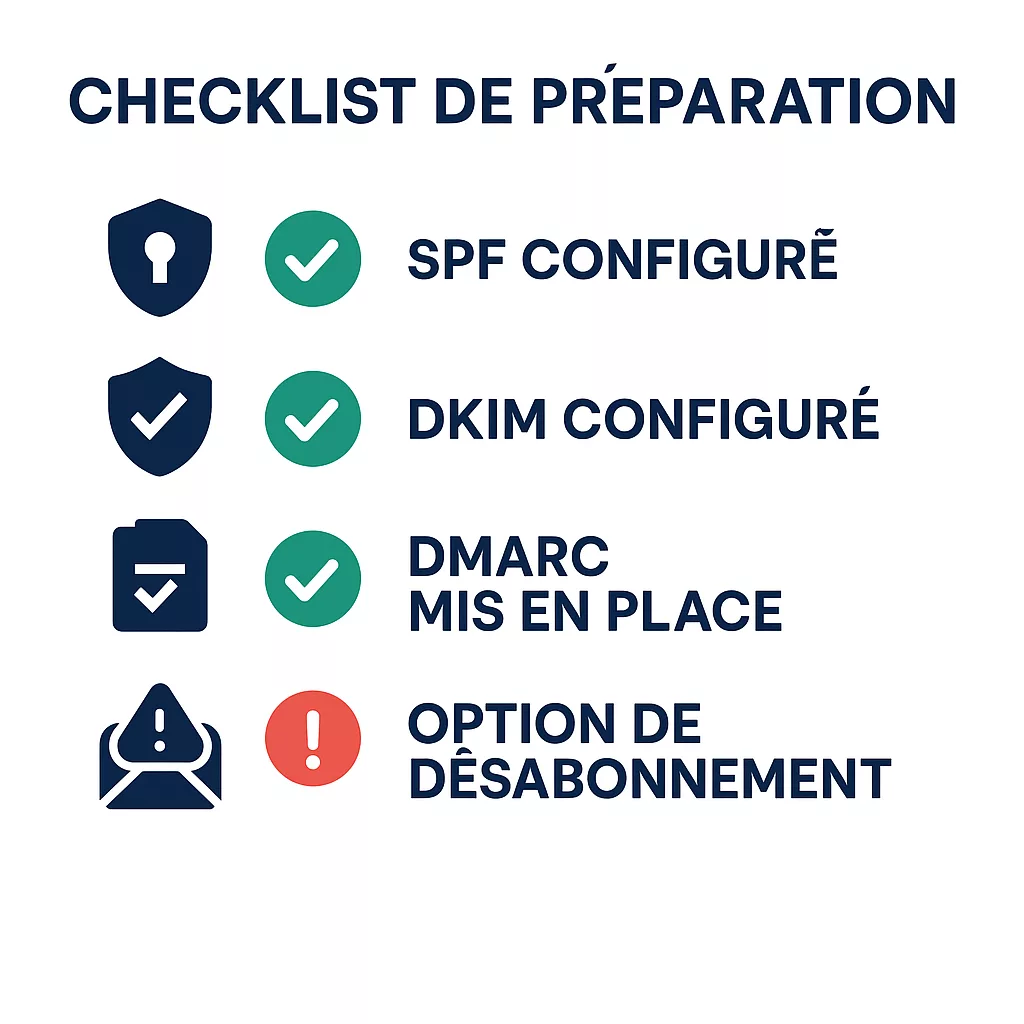
To help you review the actions you need to take before the May 5, 2025 deadline, here's an overview of what you need to do. quick preparation checklist. Use it to check that your organization is ready and compliant with the new requirements :
-
- Check your DNS authentication records Make sure that each sending domain has a valid SPF record (containing all IPs or sending services used), a correctly deployed DKIM key and active on your shipments, and a DMARC record in place (with at least
p=noneand compliant alignments between the sender domain and SPF/DKIM). Test these configurations using online tools or DMARC reports to ensure they pass checks with providers.
- Check your DNS authentication records Make sure that each sending domain has a valid SPF record (containing all IPs or sending services used), a correctly deployed DKIM key and active on your shipments, and a DMARC record in place (with at least
-
- Correct any potential issues with’authentication from now on If you don't have a DMARC policy, publish one. Don't wait until the last minute to resolve these technical issues, as DNS propagation can take a long time, and the slightest error could tip you over into spam once the tolerance threshold has expired.
-
- Control your sender and reply-to addresses Review the email addresses used in your "From" and "Reply-To" headers. Ban generic addresses that are not monitored. Each sender address must be valid and ideally be able to receive returns. If you're still using "no-reply" addresses, replace them with an address managed by your team, or at the very least clearly explain how the recipient can contact you otherwise. Match the domains used for the sender and reply-to so as not to arouse the suspicion of filters.
-
- Test the unsubscribe link in your emails Do you send a copy of your mailings or shipments? SMTP and try to unsubscribe using the provided link. Check that the process is simple and effective immediately (instant confirmation or within 24 hours maximum). Correct any malfunctions or abnormal delays. If your emails don't have an unsubscribe link, add one without fail - this is not only required by Microsoft best practices, but also by most anti-spam laws.
-
- Clean up and segment your recipient base Take advantage of this period to clean up your lists. Remove addresses that are invalid, obsolete or generate bounces (bounces). Identify long-standing inactive subscribers: consider gradually excluding them from your mailings or running a consent reconfirmation campaign, so as to retain only those contacts who are truly engaged. A smaller but responsive list is better than a plethoric file full of dormant addresses that harm your statistics and alert filters.
-
- Raise awareness among your teams and partners Ensure that all stakeholders involved in sending emails (marketing teams, email service providers, IT departments, etc.) are aware of these new rules. Share the requirements and best practices that must be followed. Specifically, verify that your technical subcontractors (routing, SMTP routing) are properly respecting SPF/DKIM on their end. It is crucial that the entire sending chain is aligned with these compliance standards.
-
- Monitor official communications.Microsoft has announced that it will provide updates on the full deployment schedule, including when the phase of complete rejection of non-compliant emails will occur. Stay tuned for official announcements or blog posts in the coming months. Consider subscribing to Office 365 or technical community news feeds. This monitoring will allow you to anticipate further adjustments and be informed as soon as a deadline for blocking is set.
By checking off all the items on this checklist, you should arrive at May 5, 2025 perfectly. prepared. Your infrastructure will meet standards, your databases will be cleaned up, and your processes will be adapted to the expectations of modern email providers. This greatly reduces the risk of unpleasant surprises.
Conclusion
New email sending requirements mark a significant step towards a safer and more reliable ecosystem. Widespread authentication via SPF, DKIM, and DMARC, coupled with exemplary list hygiene and adherence to best practices, will become the standard for anyone wishing to reach their recipients’ inboxes without issue. Although these changes may represent a considerable technical and organizational effort, they present an opportunity to’improve your performance d'emailing in the long run. Indeed, a sender who follows these rules will not only have the favor of Outlook.com, but also of all email providers, which will result in a better open rate and increased trust from their audience.
Visit countdown is underway: time is running out before the May 5, 2025 deadline. If you haven't yet begun the process, now is the time to act. now. Start today to audit your systems, train your teams and deploy the necessary solutions. The more you anticipate these adjustments, the smoother the transition will be, with no negative impact on your campaigns. Conversely, any procrastination could pay off in unexpected spam placements, a last-minute emergency that's difficult to manage, or worse, an abrupt halt to your email communications.
By taking the initiative and applying the advice presented in this article, you can turn these new obligations into assets. You'll enhance the security of your shipments and the reputation from your domain, while maximizing your chances of reaching your customers where it matters: in their inbox. Adapt to these requirements without delay – your deliverability and the effectiveness of your campaigns depend on it. Ultimately, complying with these standards isn't just an imposed constraint; it's also an opportunity to participate in cleaning up the email ecosystem and to be among the trusted senders that providers and users can count on. Prepare yourself now, and your emails will continue to arrive at their destination in 2025 and beyond.
For an overview of recommended practices by other email providers, Contact us or consult our dedicated article on Good deliverability practices at Gmail and Yahoo. You will find additional advice there on how to optimize your email shipments and ensure better reception by these services.
Sources Microsoft Tech Community, Badsender